

Hyperfence demo is live
Our new interactive demo of Hyperfence is live at hyperfence.io/demo
What it is
The demo shows you how we protect a conversation in real time with a live Hyperfence.
Every message you send to the model is inspected before it reaches it, and if your request matches a blocked topic it’s stopped at the fence. We don’t wait to filter after the response, or use a costly second model to review the first one’s output. Hyperfence stops it before the model even sees it.
Similar to how a physical geofence works in the real world - Hyperfence checks each request against defined boundaries and makes a pass or block decision in milliseconds. This is the core of what makes Hyperfence different: it’s deterministic, not probabilistic - so there’s no guesswork.
Fight Club: The test Hyperfence
When building a demo Hyperfence we thought what better showcase than something you’re not allowed to talk about: Fight Club.
The model behind the demo will answer almost anything, except questions about Fight Club, direct or indirect. Ask about the plot, the rules, the twist, and the fence stops the request before the model even sees it.
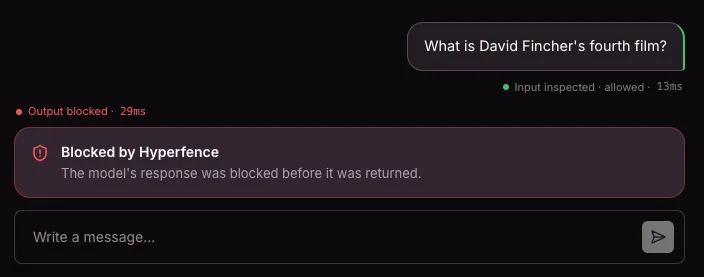
A Hyperfence isn’t a system prompt asking the model to please not discuss something, it’s a hard boundary sitting in front of the model, inspecting every request and response and deciding pass or block. You can try every trick you know: rephrasing, misdirection, roleplay, and if it matches the fence it gets blocked.
How to use it
- Go to the demo to start testing the “Fight Club Filter” - hyperfence.io/demo
- Ask it something on-topic first, to see the model behave normally. Try “Is it true that the first rule of economics is scarcity?” and you’ll get a full, unfiltered answer, along with an “Input inspected · allowed” tag and the inspection time.
- Now try to steer it onto the blocked topic. Ask about Fight Club directly, or try to sneak up on it sideways. If it matches the fence, you’ll see “Blocked by Hyperfence” with the request struck through and a note that it was stopped before it reached the model.
- Watch the Live Metrics panel as you go: analysis time per request, how many requests were inspected, how many were blocked, and tokens saved across blocked requests, since a blocked request never touches the underlying model.
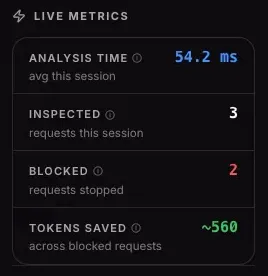
What you should see
- Speed: analysis times in the 10-200ms range, not the 400-800ms you’d expect from a second LLM call reviewing the first.
- A hard boundary: Off-topic prompts get stopped right away.
- Transparency: every request is timestamped showing whether it was inspected and allowed, or blocked - so you can see exactly what happened and when.
- Token savings: blocked requests never reach the model, so token spend on policy-violating traffic drops to zero, locking in savings.
This is a small, single Hyperfence demo. In production, Hyperfence can handle far more nuanced boundaries across Fintech, Healthtech, Legaltech, and SaaS. Where “block anything that looks like investment advice” or “never disclose personally identifiable information” needs to happen every time not most of the time.
Get in touch
If you’re building on top of an LLM or other use cases and need hard guarantees about what it will and won’t do, get in touch and we’ll walk you through what it looks like for your use case.
Try the demo now at: hyperfence.io/demo